What Is a USB-C? Differences from USB-A, USB-B Explained
If you’ve ever stared at a drawer full of tangled cables wondering why they all fit different devices, you’re not alone. USB-C changed that equation. Apple added the small oval connector to iPhone 15 in September 2023, and now every major phone maker uses it as the standard. This guide breaks down exactly what USB-C is, how it compares to the rectangular USB-A and square USB-B ports you might still have around the house, and what it means for your charging and data transfer options.
Pins: 24 ·
Reversible: Yes ·
Supports: Charging, data, video ·
Supersedes: USB-A, USB-B, Micro-USB ·
Developed by: USB Implementers Forum
Quick snapshot
- USB-C is a 24-pin reversible connector supporting charging, data transfer, and video output (ViewSonic)
- Apple introduced USB-C with iPhone 15 in September 2023, replacing the 11-year Lightning era that began with iPhone 5 in 2012 (YouTube explainer)
- EU regulations mandated USB-C on all smartphones by December 31, 2024 (iWalk Mall)
- Whether USB4 support on latest iPhones meets the full specification requirements
- Official Apple documentation on exact USB version tiers across all iPhone models
- USB-C emerged around 2014 but mainstream adoption accelerated after 2020
- iPhone 15 series launched September 2023; iPhone 16 followed September 2023
- USB-C consolidation across all device categories continues through 2025
- Future iPhones expected to maintain USB-C across all models
| Attribute | Value |
|---|---|
| Connector Type | USB Type-C |
| Pin Count | 24 |
| Reversibility | Yes |
| Max Data Speed | Up to USB 3.1 |
| Power Delivery | Yes |
What is the difference between USB-C and normal USB?
When people say “normal USB,” they’re usually referring to USB-A—the original rectangular port that dominated computers and chargers for two decades. USB-A cannot be plugged in upside down; there’s a correct orientation, marked by the small plastic ridge inside the port. USB-B, the square-shaped variant, serves printers, scanners, and projectors—devices that sit still while you work. USB-C is the newest design: a small oval that works either way up, with 24 pins instead of the 4 or 9 found in older connectors.
The practical result is faster data transfer and significantly higher power delivery. USB-C supports up to 100W at 20V compared to USB-A’s maximum of 2.5W at 5V, according to ViewSonic’s USB comparison guide. For data, USB 3.1 Gen 2 reaches 10 Gbps—roughly 20 times faster than USB 2.0, which tops out at 480 Mbps.
USB-C vs USB-A
USB-A ports appear on desktops, laptops, wall chargers, and car adapters made before 2020. The connector is rectangular, about 12mm × 4.5mm, with a metal shield and a plastic key inside that prevents upside-down insertion. Data speeds top out at USB 3.0 (5 Gbps) even on newer implementations. Power output maxes out at 2.5W—enough for a phone battery but too weak to charge a laptop.
USB-C fits phones, tablets, laptops, monitors, and even some printers. It delivers up to 100W and supports USB 3.2 speeds up to 20 Gbps. The reversibility alone saves time; fumbling with a USB-A port in low light is a solved problem. If you own a MacBook since 2015 or an iPhone 15 and later, you already have USB-C.
USB-C vs USB-B
USB-B serves a different purpose: wired connections for stationary peripherals. Printers, scanners, older external hard drives, and some audio interfaces use the square USB-B port. The cable is typically non-reversible and meant to stay connected. USB-C has made inroads here too—many new printers now include USB-C alongside traditional USB-B. But USB-B remains relevant for legacy hardware.
The key distinction is context: USB-B is for peripherals that don’t move; USB-C is for everything that does. ST Chargers’ comparison guide details how each connector appears on different device categories.
How do I know if I have USB-A or C?
Shape and size differences
USB-A ports are rectangular and roughly 12mm wide, with a visible ridge of plastic or metal inside the port that creates a notch on one side. USB-C ports are oval or rounded-rectangle, about 8.4mm × 2.6mm—visibly smaller and noticeably symmetrical. When you hold a USB-C plug, you’ll notice it looks the same flipped upside down.
USB-A plugs only go in one way; if they resist, you’re wrong. On laptops, USB-A ports are often labeled with the standard USB trident symbol. USB-C ports may be unlabeled or marked with a small “C” or the USB trident plus a battery icon for power delivery.
Port identification tips
If your device has only one type of port, look at the physical shape first. Apple laptops made after 2015 (MacBook, MacBook Air, MacBook Pro) have USB-C exclusively for data and charging—no USB-A. iPhone 15 and later have a small oval USB-C port on the bottom edge, replacing the Lightning port that iPhones used from 2012 to 2023. Android phones have used USB-C since around 2016.
To confirm, check the device’s specifications online or look at the cable that came in the box: a USB-C cable has the same small oval plug at both ends (or USB-A to USB-C). A USB-A cable has the rectangular plug. Cable Matters provides a visual guide to identifying each port type.
What does a USB-C plug look like?
Here is how USB-C stacks up against the other common connector types in everyday use.
Visual characteristics
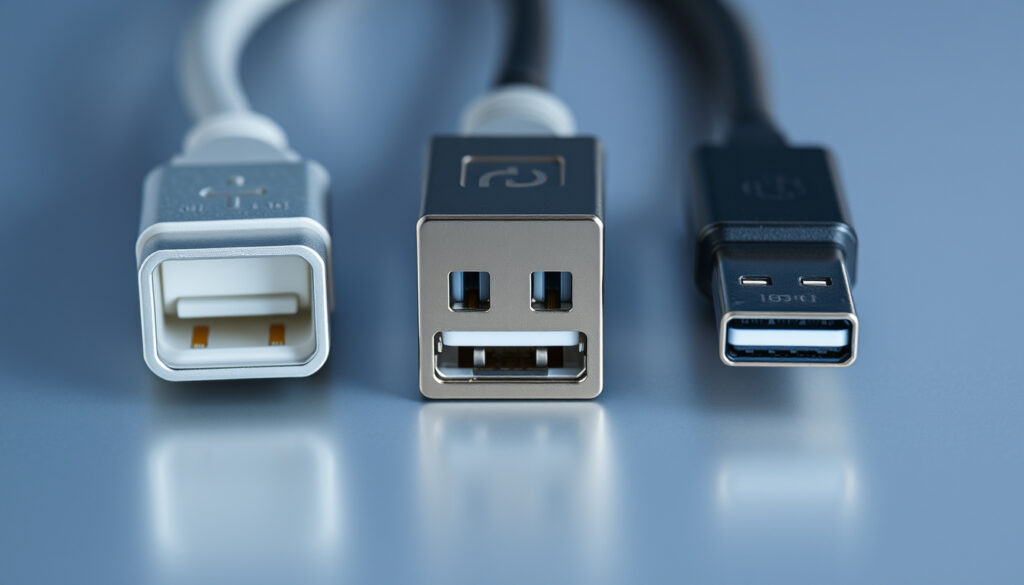
A USB-C plug is roughly the size of a small almond: 8.4mm wide and 2.6mm tall, with rounded corners and a smooth metal housing. There is no plastic key inside—the 24 pins are arranged symmetrically so the connector works in either orientation. The metal shell typically has a matte or brushed finish with slightly rounded edges.
By contrast, USB-A plugs are rectangular with a distinct ridge on the inside face that prevents rotation. USB-B plugs are square with angled corners. Micro-USB, once common on Android phones, is narrower and flatter than USB-C with a visible seam on one side.
Compared to other types
When placed side by side, USB-C’s oval shape stands out against USB-A’s rectangle and USB-B’s square. The size difference is subtle until you hold them: USB-C feels compact and smooth; USB-A feels chunky by comparison.
Lightning, Apple’s former proprietary connector, is similar in size to USB-C but has a different 8-pin layout and only works with Apple devices. USB-C’s 24 pins enable multiple functions—charging, data, video, audio—through a single port. Decipher Tools’ cable guide compares each connector type with photographs.
Can you plug a USB-C into a USB port?
Adapter requirements
No USB-C device plugs directly into a USB-A or USB-B port without an adapter or the correct cable. A USB-C cable has the small oval plug; a USB-A port is rectangular. The two shapes are physically incompatible—a USB-C plug simply will not fit a USB-A port.
However, USB-A to USB-C cables and USB-C to USB-A adapters exist specifically for this situation. Cable Matters sells adapters and cables for USB-A to USB-C connections. These let you charge an iPhone 15 or later from an older USB-A charger or connect a USB-C device to a computer with only USB-A ports.
What works and what breaks
USB-C to USB-A adapters work for charging and USB 2.0 data transfer, but they cannot carry USB 3.0+ speeds or video output. A USB-C laptop charging cable connected through an adapter to a USB-A port will charge slowly—typically 5W or less.
A USB-C monitor connected to a laptop with only a USB-A to USB-C adapter will not display anything. USB-C to USB-B cables work for connecting printers or scanners that still use USB-B ports. Backward compatibility is partial, not seamless.
The implication: adapters bridge the physical gap but force trade-offs in speed and capability that matter for power users.
Do iPhones use USB-C?
iPhone transition
Yes. Every iPhone model released since September 2023—iPhone 15, iPhone 15 Plus, iPhone 15 Pro, iPhone 15 Pro Max, iPhone 16, iPhone 16 Plus, iPhone 16 Pro, and iPhone 16 Pro Max—uses a USB-C port. Apple announced this transition at the September 2023 Apple Fall Event. The change ended an 11-year era that began in September 2012 with iPhone 5, which replaced the original 30-pin connector with Lightning.
Apple made the switch to comply with EU regulations requiring USB-C on all smartphones sold in the European Union by December 31, 2024. Senior Apple executives confirmed the transition in advance. iPhone 16 and subsequent series continue the USB-C standard.
Disadvantages on iPhones
USB-C on iPhone brings genuine improvements—faster charging, universal cable compatibility, and support for external storage and monitors. However, not all USB-C on iPhone is equal. iPhone 15 and iPhone 16 standard models use USB 2.0 (480 Mbps), the same speed as Lightning. Pro models—iPhone 15 Pro, iPhone 16 Pro, and iPhone 16 Pro Max—support USB 3 (10 Gbps), which is roughly 20× faster for transferring files and ProRAW photos.
The iPhone 15 Pro can reach 50% charge in 30 minutes using a 20W or higher USB-C power adapter, according to XOXO Wildhearts’ model guide. Standard models charge at the same rate but transfer data more slowly.
| Feature | USB-A | USB-B | USB-C |
|---|---|---|---|
| Shape | Rectangular | Square | Oval |
| Reversible | No | No | Yes |
| Pin Count | 4–9 | 4–9 | 24 |
| Max Power | 2.5W (5V, 0.5A) | Varies | 100W (20V, 5A) |
| Max Speed | 5 Gbps (USB 3.0) | 5 Gbps (USB 3.0) | 20 Gbps (USB 3.2) |
| Common Use | Computers, chargers | Printers, scanners | Phones, laptops, monitors |
Upsides
- Reversible plug eliminates fumbling
- Supports up to 100W power delivery—charges laptops
- Up to 20 Gbps data transfer (USB 3.2)
- Carries video and audio via Alternate Modes
- One cable for phones, tablets, laptops
Downsides
- Not backward compatible without adapters
- Cables vary in quality and supported features
- USB 2.0 speed on standard iPhone 15/16 models
- Some cheap cables lack proper E-marker chips
- USB-A chargers limit USB-C fast charging potential
How to use USB-C effectively
Three connector types, one reversible standard. Here’s how to navigate the transition.
- Identify your ports. Check your laptop, desktop, or device for USB-A (rectangular) or USB-C (small oval) ports. Labeled ports typically show a USB trident symbol; USB-C may also include a battery icon indicating power delivery.
- Match your cable. Use USB-C to USB-C cables for iPhone 15+ charging from USB-C adapters or laptops. Use USB-A to USB-C cables for older chargers or computers. Use USB-C to USB-B for printers. Decipher Tools’ cable guide covers the details.
- Check power delivery. USB-C supports up to 100W at 20V, but not all cables or chargers deliver full power. Look for cables labeled “E-marker” for high-wattage connections. A 20W+ USB-C adapter charges iPhone 15/16 to 50% in 30 minutes.
- Consider data speed needs. If transferring large files, use a USB 3 cable and ensure the port and device both support USB 3. USB 2.0 on standard iPhone 15/16 models limits data transfer to 480 Mbps—adequate for syncing but slower than Pro models.
USB-C is not just a shape—it’s a single standard replacing USB-A, USB-B, Micro-USB, and proprietary alternatives. The physical design is reversible, the electrical design supports high power and high speed, and the USB Implementers Forum maintains compatibility across generations. For consumers, the payoff is a single cable drawer.
Confirmed
- USB-C is a reversible 24-pin connector standard
- USB-C supersedes USB-A, USB-B, and Micro-USB
- iPhone 15 and later use USB-C
- EU mandate required USB-C on all smartphones by December 31, 2024
- USB-C delivers up to 100W power and 20 Gbps data transfer
- iPhone 15 Pro and Pro Max support USB 3 speeds up to 10 Gbps
Unclear
- Whether USB4 support on iPhones meets the full specification
- Official Apple documentation on exact USB version tiers across all models
“With the iPhone 15 and 15 Pro, Apple is officially switching from Lightning to USB-C, 11 years after they switched from the 30-pin connector.”
— YouTube video narrator, YouTube explainer
“Apple has until the end of 2024 to comply with these new EU regulations, and senior executives have confirmed this upcoming transition.”
— iWalk Mall tech trends analysis, iWalk Mall
For anyone buying a new phone, tablet, or laptop today, USB-C is the default. Apple’s transition with iPhone 15 and later removed the last major reason to carry a proprietary cable. The EU mandate accelerated a shift that benefits consumers with a single cable standard across brands. iPhone 15 Pro and Pro Max users get the full speed advantage—10 Gbps for ProRAW transfers and external storage. Standard model owners still charge quickly but transfer data at Lightning speeds. The message is clear: USB-C is the universal standard now, and the era of carrying multiple cable types is ending.
Related reading: Battery Health Check iPhone · Samsung Find My Mobile
While USB-C revolutionizes connectivity over USB-A and USB-B, adapters bridge legacy devices effectively, as this USB to USB-C adapter guide explains with compatibility and speed details.
Frequently asked questions
What is a USB-C used for?
USB-C charges devices and transfers data at up to 20 Gbps. It also carries video and audio signals through Alternate Modes, enabling USB-C monitors and docking stations. A single USB-C port replaces USB-A, USB-B, HDMI, and power ports on modern laptops.
Does every phone use USB-C?
Most Android phones have used USB-C since around 2016. iPhones adopted USB-C starting with the iPhone 15 series in September 2023. Some budget phones and older devices still use Micro-USB. The EU mandate requires USB-C on all smartphones sold in the EU by the end of 2024, driving broader adoption.
What is USB-A?
USB-A is the original USB connector, a rectangular port about 12mm wide. It appears on computers, wall chargers, car chargers, and power banks made before 2020. USB-A is not reversible and tops out at 2.5W and USB 3.0 speeds.
What is USB-B?
USB-B is a square connector used for printers, scanners, and projectors. It connects stationary peripherals to computers. USB-C has begun replacing USB-B on newer devices, but USB-B remains common on legacy office equipment.
What are the disadvantages of USB-C on iPhones?
The main disadvantage is speed inconsistency: standard iPhone 15 and 16 models use USB 2.0 (480 Mbps), the same as Lightning. Pro models use USB 3 (10 Gbps). Users with high-speed data needs must buy Pro models. Some USB-C cables are poorly made and lack proper E-marker chips, limiting power delivery.
Can USB-C support video output?
Yes. USB-C Alternate Modes allow the connector to carry DisplayPort, HDMI, or VGA signals. iPhone 15 Pro and Pro Max support external display output. Not all USB-C devices support video output—check specifications before purchasing adapters or cables.
More related posts
 ETS KL to JB – Timetable, Fares and Booking Guide
 How to Download Video from Any Website: 2025 Guide
 Nottingham Forest vs Tottenham Standings: Table & Analysis
 Top Digital Signage Companies 2026: Best Providers Ranked
 CPF Full Retirement Sum 2025: How Much and How It Work
 How to Get Rid of Dark Eye Circles Fast
 English to Tamil Translation: Best Tools, Apps & Tips
 Lee Min Ho and Song Hye Kyo: Rumors, Status, Facts