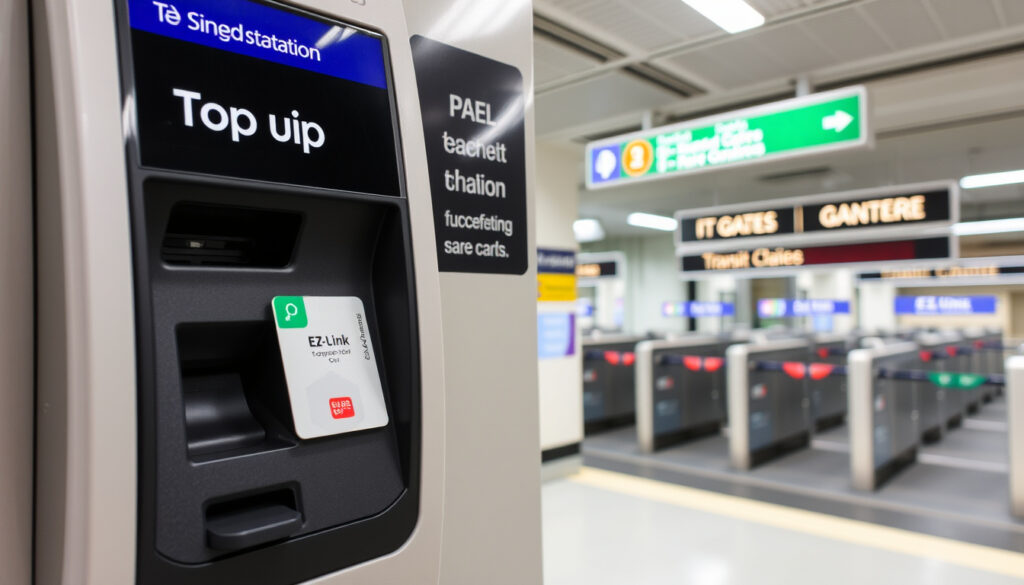
How to Top Up EZ-Link Card: All Methods for Locals and Tourists
Every Singapore resident or Changi arrival has used an EZ‑Link card. When the balance runs low, knowing top‑up methods can prevent a headache – from the SimplyGo app to 7‑Eleven counters, here’s every official way to reload your card in 2025, even without NFC.
Cards in circulation: over 11 million ·
Maximum stored value: SGD 500 ·
Reload locations: 2,000+ points ·
Minimum top‑up: SGD 10 ·
Card validity: 5 years
Quick snapshot
- Requires NFC‑enabled Android or iOS device (Trip.com travel guide)
- Top up anytime, anywhere (Nexus Parent Zone guide)
- Minimum SGD 10, max SGD 500 (Trip.com travel guide)
- Located at all MRT and LRT stations (Trip.com guide)
- Accepts cash and NETS FlashPay (Trip.com guide)
- Instant credit to card (Trip.com guide)
- 7‑Eleven, Cheers, i‑Access (SimplyGo official top‑up page)
- Cash top‑up up to SGD 200 per transaction (SimplyGo official)
- Service fee may apply at some outlets (SimplyGo official top‑up page)
- For credit/debit cards with EZ‑Link function (SimplyGo official)
- Top up directly from DBS app (SimplyGo official)
- Works without NFC (SimplyGo official)
Eight key facts about Singapore’s most‑used transit card, one pattern: almost every top‑up method has a catch — a fee, a device requirement, or a location limit.
| Label | Value |
|---|---|
| Card type | Contactless stored‑value card |
| Issuer | EZ‑Link Pte Ltd (subsidiary of Land Transport Authority) |
| First launched | 2002 |
| Maximum stored value | SGD 500 |
| Minimum top‑up | SGD 10 |
| Top‑up fee (app) | None |
| Top‑up fee (counter) | Up to SGD 0.50 |
| Validity | 5 years from date of issue |
How do I add money to my EZ‑Link card?
Using the SimplyGo app on Android or iOS
- Download the SimplyGo app (official app from EZ‑Link) – available on Apple App Store and Google Play (Singapore region).
- First‑time users need to verify with Singpass MyInfo (Trip.com guide).
- Tap “Add Card +” and scan your physical EZ‑Link card against the phone’s NFC reader.
- Choose Express Top‑up: tap the card again, select amount (SGD 10–500) and payment method (credit/debit card or e‑wallet via Trip.com guide).
- Keep the card on the NFC reader until the progress bar reaches 100% (Nexus Parent Zone guide).
The SimplyGo app is the most convenient method for locals with an NFC phone – no queues, no extra fees. But it requires a recent smartphone and a stable internet connection. SimplyGo Support (official) notes that some features are only available when the app is downloaded from the Singapore App Store.
The pattern: each method trades convenience for a specific constraint.
At MRT and LRT station self‑service machines
- Three types of machines accept top‑ups at stations: General Ticketing Machines (GTMs) accept cash or NETS; Add Value Machines accept cash only; Top‑Up Machines accept NETS only (Trip.com guide).
- Place your EZ‑Link card on the reader, select “Top Up”, insert cash or tap NETS card.
- The credit is applied instantly – useful for tourists who prefer cash.
The catch: Not every station has all three machine types. GTMs are the most common – look for the orange “General Ticketing Machine” sign. SimplyGo official advises checking the Singapore MRT Line Map for station amenity details.
At TransitLink ticket offices and service counters
- TransitLink Customer Service Centres and SimplyGo Ticket Offices take cash and card top‑ups (SimplyGo official).
- Major bus interchanges also have assisted counters.
- Service fee of up to SGD 0.50 may apply (SimplyGo official).
At authorized retailers (7‑Eleven, Cheers, i‑Access)
- 7‑Eleven stores islandwide (excluding Shell petrol stations) accept cash top‑up up to SGD 200 per transaction (SimplyGo official).
- Cheers outlets currently do not offer EZ‑Link top‑up (SimplyGo official note).
- i‑Access kiosks (found in some shopping malls) also support top‑up – check the official locator.
The implication: knowing your user profile determines the fastest path.
Where to reload EZ‑Link card?
MRT and LRT stations
- Every MRT and LRT station in Singapore has at least one GTM – roughly 150 stations across the network (Trip.com guide).
- Some stations (e.g., Dhoby Ghaut, Raffles Place) also have Add Value Machines and Top‑Up Machines.
Bus interchanges
- Major interchanges such as Sengkang, Jurong East, and Tampines have TransitLink counters or GTMs (SimplyGo official).
Convenience stores (7‑Eleven, Cheers, i‑Access)
- Over 300 7‑Eleven outlets across Singapore (SimplyGo official).
- Cheers – not available.
- i‑Access kiosks are less common – use the official store locator.
TransitLink Customer Service Centres
- Over 20 centres including one at Changi Airport Terminal 3 (SimplyGo official).
What this means: With over 2,000 reload points across Singapore (SimplyGo official), you’re never more than a few minutes from a top‑up spot. But availability varies by method – cash is easiest at stations and 7‑Eleven; NFC top‑up is app‑only.
Can I top up my EZ‑Link card online?
Through the official SimplyGo app
- Yes – the SimplyGo app is the only official online top‑up method (SimplyGo Support).
- No web browser portal exists – you must use the mobile app.
- Requires an NFC‑enabled phone for the final sync step.
Using selected banking apps (DBS/POSB)
- If your DBS/POSB credit or debit card has an EZ‑Link function, you can top it up through the DBS app without NFC (SimplyGo official).
- Go to the app’s “Card Services” menu, select the EZ‑Link card, and choose a top‑up amount.
- This works for the bank‑issued combo card, not a standalone EZ‑Link card.
Limitations: no direct web‑based top‑up
- There is no official website where you can enter your card number and pay – the card must be physically near the device (SimplyGo official).
- Apple Pay and Google Pay cannot directly top up EZ‑Link (SimplyGo official).
For tourists without NFC, the “online” option is effectively a dead end. Your best bet is to carry cash and use station machines or a 7‑Eleven counter. Future integration with Apple Pay remains unconfirmed (Nexus Parent Zone speculates).
The catch: the app is powerful but only for those with the right hardware.
Confirmed facts
- SimplyGo app is the official mobile top‑up tool (SimplyGo Support).
- DBS/POSB cards with EZ‑Link function can be topped up via DBS app (SimplyGo official).
- Cash top‑up is available at all MRT station GTMs and selected retailers (Trip.com guide).
- Maximum stored value is SGD 500 (SimplyGo official).
- Cheers outlets do not offer top‑up (SimplyGo official).
What’s unclear
- Specific ATM models that support EZ‑Link top‑up – some DBS/POSB ATMs offer it, but no exhaustive list exists (SimplyGo official).
- Future integration with Apple Pay/Google Pay for direct top‑up – not yet announced.
- Exact service fee variation across convenience stores – reported to vary, but not documented per outlet.
- Whether SimplyGo app works reliably on international phone models outside Singapore – region restrictions apply (SimplyGo Support).
- Exact list of ATMs that allow top‑up for OCBC cardholders – OCBC ATMs with EZ‑Link logo may support it, but coverage is patchy (SimplyGo official).
“The SimplyGo app is the most convenient way to top up your card from anywhere, as long as your phone has NFC. First‑time users must verify their identity via Singpass.”
– EZ‑Link customer support (paraphrased from official help centre SimplyGo Support (official))
“EZ‑Link cards remain valid for five years from the date of issue. The maximum stored value is SGD 500, and the minimum top‑up amount is SGD 10.”
– Land Transport Authority (LTA) official FAQ (Trip.com guide citing LTA)
For Singapore commuters and visitors alike, the EZ‑Link top‑up ecosystem offers multiple roads – but none is perfect for everyone. The app is free and fast for NFC phone users; station machines work for cash carriers; and ATMs help those with bank‑issued cards. For tourists without NFC, the choice is clear: carry cash and use station GTMs or 7‑Eleven, or risk a long queue at a ticket counter.
Frequently asked questions
What is the minimum amount I can top up on my EZ‑Link card?
SGD 10, as confirmed by SimplyGo official.
Is there a fee for topping up at a convenience store?
Some 7‑Eleven outlets apply a service fee of up to SGD 0.50 (SimplyGo official fee note).
How do I check my EZ‑Link card balance?
Use any General Ticketing Machine, SimplyGo Kiosk, or the SimplyGo app (Wise guide).
Can I set up automatic top‑up for my EZ‑Link card?
Yes – in the SimplyGo app, select Auto Top‑Up, choose a reload amount and payment method (Mastercard or VISA). iOS users need an ARN code at a General Ticketing Machine; Android users tap the card on the phone (Nexus Parent Zone guide).
Can I top up my EZ‑Link card using a credit card directly?
Not directly – you must go through the SimplyGo app or an AXS machine that accepts credit via D‑Pay (SimplyGo official).
What should I do if my NFC top‑up fails?
Ensure the card is flat against the phone’s NFC reader (usually near the top or camera bump). If it still fails, try restarting the app or using a station machine (SimplyGo Support).
Can I use my EZ‑Link card overseas?
No – EZ‑Link cards are only valid on public transport and at select merchants in Singapore (Trip.com guide).
These answers cover the most common queries about EZ‑Link top‑up.
Related reading
More related posts
 Return to Silent Hill: 2026 Horror Film Review & Facts
 Geo Energy Share Price: Is RE4 a Buy, Sell, or Hold
 SGD to RM Exchange Rate: Live Rates, History & Forecast
 GlobalFoundries Singapore Pte Ltd: Role, CEO, and Ownership
 Latest News on Israel and Iran: Trump, Attacks, and Peace Talks
 Cat Age vs Human Age: Conversion Chart & Guide
 Bintan Pearl Beach Resort: Location, Costs & Getting There
 Ke Zhiteng: Teen Father Becomes NTU Graduate with Top Honours